Extensions
To keep the interface clean and approachable for beginners, CapyCode organizes its advanced tools and secondary languages into built-in extensions.
You can enable or disable them at any time from the Extensions panel (blocks icon in the activity bar, or Ctrl+Shift+X).
Available extensions
| Extension | Purpose | Default state |
|---|---|---|
| Error Detection (Linter) | Analyzes your Python code on every keystroke using Ruff, without running it. Underlines syntax errors, typos and unused variables, and updates the status bar problem counter. | Enabled |
| Source Control (Git) | Enables the Git panel, commit history graph, file diffs, and branch & merge management. | Disabled |
| Code Formatter | Adds the Format button and the Shift+Alt+F shortcut to reformat Python code according to PEP 8 standards. | Disabled |
| Document Outline | Adds the Outline view in the activity bar (classes, functions, methods) and enables code folding arrows in the editor gutter. | Disabled |
| SQL Support | Enables running SQL queries (SQLite) from the editor and viewing results in an interactive table. | Disabled |
| OCaml Support | Enables running OCaml programs in a dedicated console. | Disabled |
Installing or uninstalling an extension
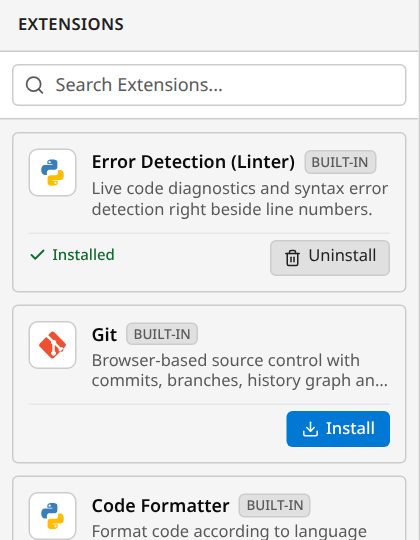
- Open the Extensions panel (
Ctrl+Shift+X, or click the blocks icon in the activity bar). - For each listed extension, click Install to enable it, or Uninstall to disable it.
- The corresponding buttons, views, and commands appear or disappear immediately.
CapyCode remembers your choices in your browser: your extensions remain active during future visits.
Memory efficiency and speed
The SQL and OCaml interpreters weigh several megabytes of WebAssembly code. Keeping them disabled by default allows CapyCode to load faster and consume less network bandwidth and memory when working in Python.
Sharing a project with its extensions
When you create a share link, the share window allows you to select active extensions required by your project.
When a recipient opens the link, CapyCode automatically enables the selected extensions (such as Git or SQL) so they can run and inspect the project right away.